
Hat tip to Tracey Santos for asking about this.
In GP 2013, there is an option to password protect a Word document when sending it out, but it doesn’t work quite the way you might expect it to. The password doesn’t protect against opening the document. It protects against EDITING the document. Essentially, it’s a secure way to send out a Word document without worrying about someone changing it at the other end.
The setting is found in Tools>Setup>System>System Preferences.
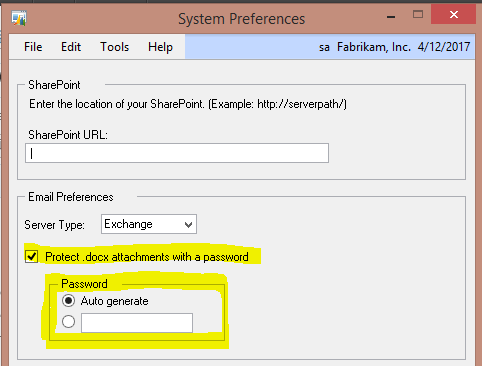
Once you elect to password protect .docx attachments, there is a choice to auto generate a password or assign a specific password. If you auto generate a password, the password is not disclosed anywhere. In other words, you can’t give someone the password to open the emailed Word file because GP doesn’t reveal it.
If there is a chance that you want to let the end user edit the document, you’ll need to specifically assign a password that you can send out to edit the document.
Remember, either way, the receiver will be able to open the document, they just won’t be able to modify it without the password.