
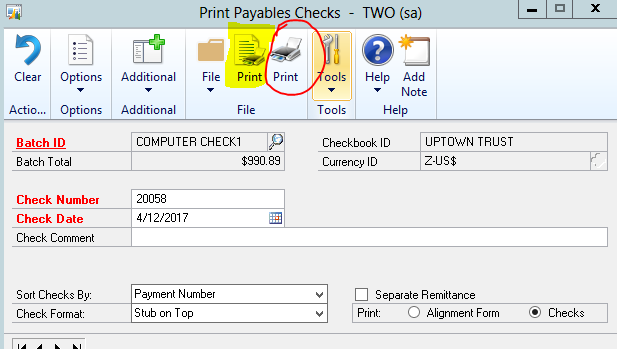
GP 2013 R2 introduced the Action Pane (for those who live in the real world, the “ribbon”). It’s new so it’s still got a few quirks. Unfortunately, one of those quirks comes when printing AP checks. On the Print Payables Checks window there are actually two print icons. One with a piece of paper like a document behind it and a plain one.
The left most one, the one with document behind it (highlighted in yellow below) actually prints checks. The plain icon (circled in red below) prints an edit list. There is one other clue. Until you pick a batch in Batch ID, only the plain icon exists. The ability to print checks isn’t activated until you pick a batch
Frankly this just seems like a quality issue that needs to get fixed. I’ve created a connect item to bring this to the team’s attention. You can vote for it at https://connect.microsoft.com/dynamicssuggestions/feedback/details/925337/fix-print-icon-in-gp-2013-r2-print-paybles-checks