
I realized that last week’s post probably wasn’t clear enough so I’m adding more detail this week.
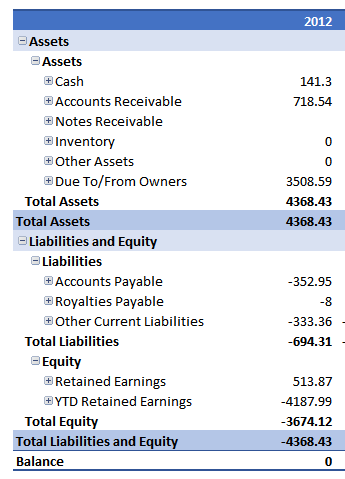
Above we have a raw pivot table financial statement. Assets positive, Liabilities/Equity negative. The Balance Sheet Balances but it’s ugly. To fix this I:
- Selected the Total Liabilities and Equity line
- Right Click | Value Field Settings | Number Format
- Pick my custom format _(* (#,##0);_(* #,##0_);_(* “-“??_);_(@_) Notice that the parentheses are switched. Positive numbers have parentheses.
Now the values switch and the Liabilities and Equity are positive, Assets are negative.
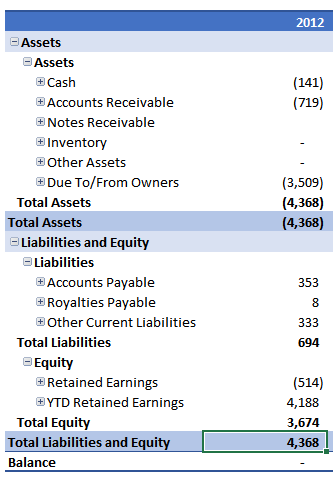
We’re halfway there. Next I:
- Highlighed the Asset amounts
- I clicked the Comma icon to format the assets as Accounting, no currency symbol.
- Clicked the Decrease Decimal icon twice to remove the pennies.
With that, the assets are positive, the liabilities are positive so this looks like a real Balance Sheet.
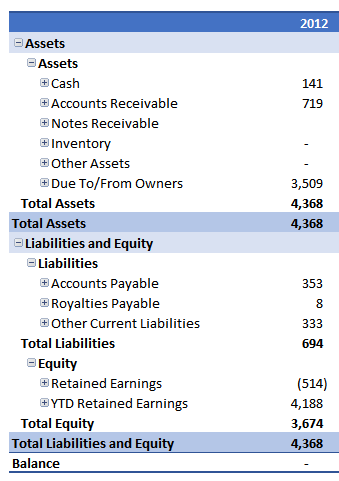
The key is that we are manipulating how the items look, not how the calculations are done.