
We’ve looked at drilling down from Excel by using a hyperlink to lookup a record in GP. Michelle Kocher was recently looking to do this from SSRS and she was kind enough to share the details.
In the Properties for the Text Box that holds the document that you want to add the hyper link to:
- Pick Action
- Pick Go to URL
- Click the box to add an expression
- Paste in your hyperlink (usually this comes from a refreshable Excel data connection)
- Put an equal sign in front and double quotes around the hyperlink.
- For parameters, close the expression with a double quotes, use the plus + sign to connect fields for lookup.
- You might want to rtrim the items to remove spaces at the right.
In the expression below, Michelle breaks out of the hyperlink to connect a beginning SOP value, continues the hyperlink and breaks out again to connect an ending SOP value. The breakouts are surrounded by plus signs and use rtrim to remove excess spaces.
We both wrestled with this a little bit and couldn’t find a good example of what the expression should look like so we thought we would share this with you and have it available for the next time we need it.
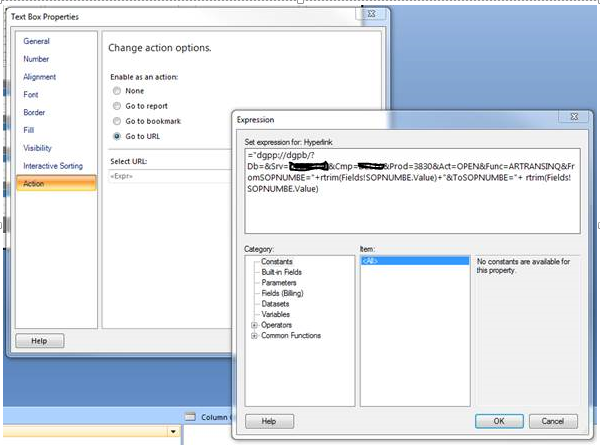 The server and company have been hidden for privacy reasons